projects
mooringDesignSimulator v2
Python/Qt desktop application used to design static oceanographic moorings, run simulations, visualize results, and generate PDF reports.
Status: In active development
Repository: private
Documentation: Link
Release: Download
Overview
mooringDesignSimulator-v2 is a desktop application developed in Python and Qt to design static subsurface oceanographic mooring lines. It can manage a component library, build the mooring visually, run a simulation, visualize the results, and produce a PDF report.
This work follows an earlier tool developed at LOPS (Laboratoire d’Océanographie Physique et Spatiale) at Ifremer Brest by an engineering school intern a few years ago, in response to practical needs for cruise preparation, configuration checking, and result sharing.
The goal is not only to draw a mooring line. The software also helps prepare a coherent working project, organize components, run a simulation, review results, and produce a PDF report that can be used by the technical teams responsible for preparing, manufacturing, and assembling the mooring components before shipping and deployment.
Why revisit this tool
The previous version of the software, developed in Python 2.x and Qt4, was no longer maintainable and, although still usable, showed bugs. Some features requested by technical teams were also missing.
For this version 2.x, I chose to keep a user interface (UI) as close as possible to that of version 1, while completely rewriting the code using modern and reliable programming techniques.
This work focused on consolidating the application around a more robust foundation:
- a clearer application entry point
- real project persistence with an embedded relational database
- an improved graphical design interface
- a more explicit simulation pipeline
- better structured PDF report generation
- a test suite to verify sensitive areas and make future changes more robust
- the introduction of a continuous integration (
Continuous Integration,CI) chain to verify after every source code change that the modifications do not introduce regressions into the application
Compared with the previous save model, this approach makes projects easier to structure, allows moorings created with version 1 to be imported, and supports features requested by users.
What the software can do
- load an oceanographic component library
- build a mooring line graphically
- import files from version 1
- adjust segment properties
- save and reload projects in different formats
- run a static simulation
- visualize results as tables and charts
- produce a usable PDF report
Main interface
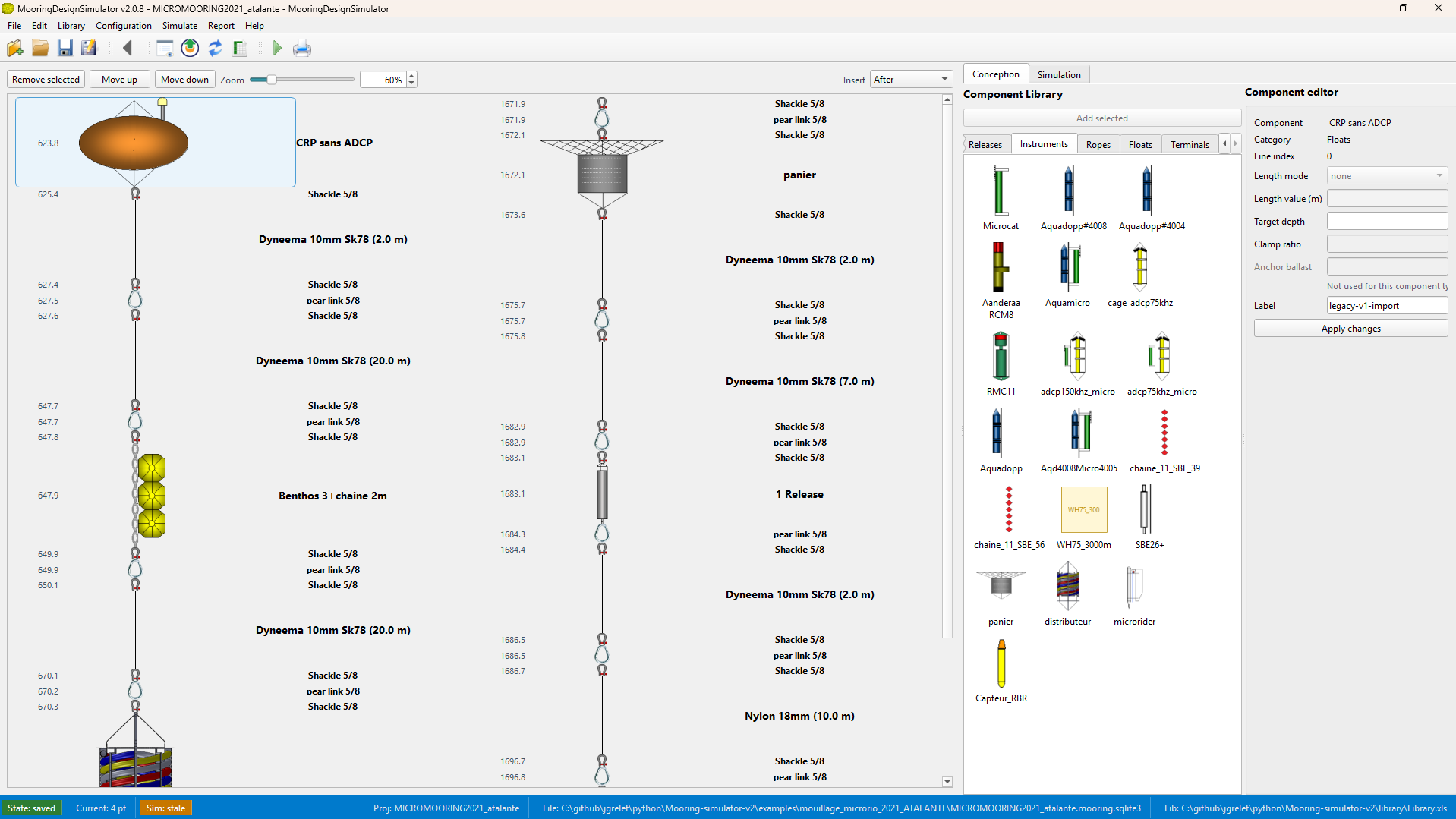
Main application view with the design workspace, the component palette, and the main working controls.
Key technical points
The current version relies on a clearer architecture and uses reliable, proven programming techniques:
- desktop user interface built with
PySide6 - project persistence based on
SQLite, a relational database - explicit simulation pipeline: adaptation, preprocessing, solver, output
- component library managed through a
SQLitecache - unit and integration tests for the most structuring parts of the application
This separation matters because it makes the tool easier to maintain and evolve.
Data formats and workflow
The main working format is a SQLite database, usually stored as *.mooring.sqlite3. The application can also import or export JSON snapshots, but the core workflow relies on a stronger and better structured persistence layer.
On the simulation side, the project follows a simple sequence:
- read the project
- adapt it to the simulation models
- preprocess the data
- run the static solver
- return the results in the interface and in the PDF report
Intended audience
The software is aimed at people who prepare or design oceanographic moorings and need a visual, reproducible, and documented tool for working on static configurations.
Some of the improvements made also simplify cable-length preparation by providing the marking distances for instruments clamped onto the cables.
Documentation and evolution
The repository includes:
- a
README.mdfor development and execution - architecture documentation in French and English
- notes on the simulation algorithms
- examples and a component library
- GitHub Actions workflows to run integration tests after each repository change and generate multiplatform executables for each new
release
Documentation
Documentation derived from the wiki is also available on this site:
Links
- Source repository: private
- Public documentation: Open documentation
- Shared archives: Access files